
One of the nice things about having a bunch of credit cards is that they come with all sorts of benefits that most people don’t know about. In particular, many credit cards come with insurance benefits that can help you out when something goes wrong.
For example, several years ago, I had a flight get canceled because of a snowstorm. Luckily, because I’d booked the flight with my Chase Sapphire Reserve, the trip delay insurance kicked in, providing me with $500 per person for food and hotels for the night.
I recently had the opportunity to test out another one of these insurance benefits after someone stole my MacBook Air. The laptop was practically brand new, having been purchased less than four months earlier. Fortunately for me, I’d paid for the laptop using my Chase Ink Business Cash credit card, which comes with a benefit called Purchase Protection. This benefit covers eligible purchases against theft or damage for a certain period after purchase.
I almost forgot about this benefit until my brother asked if I had AppleCare or some other insurance that might cover the theft. After doing some research, I realized that Chase offered 120 days of Purchase Protection. Luckily, I’d purchased the laptop just barely within that coverage period.
I wasn’t sure whether my situation would qualify or how difficult the claim process would be.
But as it turns out, Chase approved my claim and reimbursed me the entire $1,204.14 purchase price of the laptop in just nine days!
I figured this was a story worth sharing, especially since it might help someone else who finds themselves in a similar situation
So, here’s what happened with my laptop, how I went about filing my claim, and what I learned about Chase Purchase Protection.
How My MacBook Air Was Stolen
Back in August, I stopped at McDonald’s to get some coffee after dropping my son off at daycare. This is a normal part of my morning routine. I always place my order using the McDonald’s app and then go inside to grab my coffee (which is usually ready for me when I arrive).
At the time, I was riding my Urban Arrow cargo bike. I had my backpack with me, and since it was raining, I had the rain cover on with my backpack sitting inside the bike.
This is basically what my bike looked like that morning.
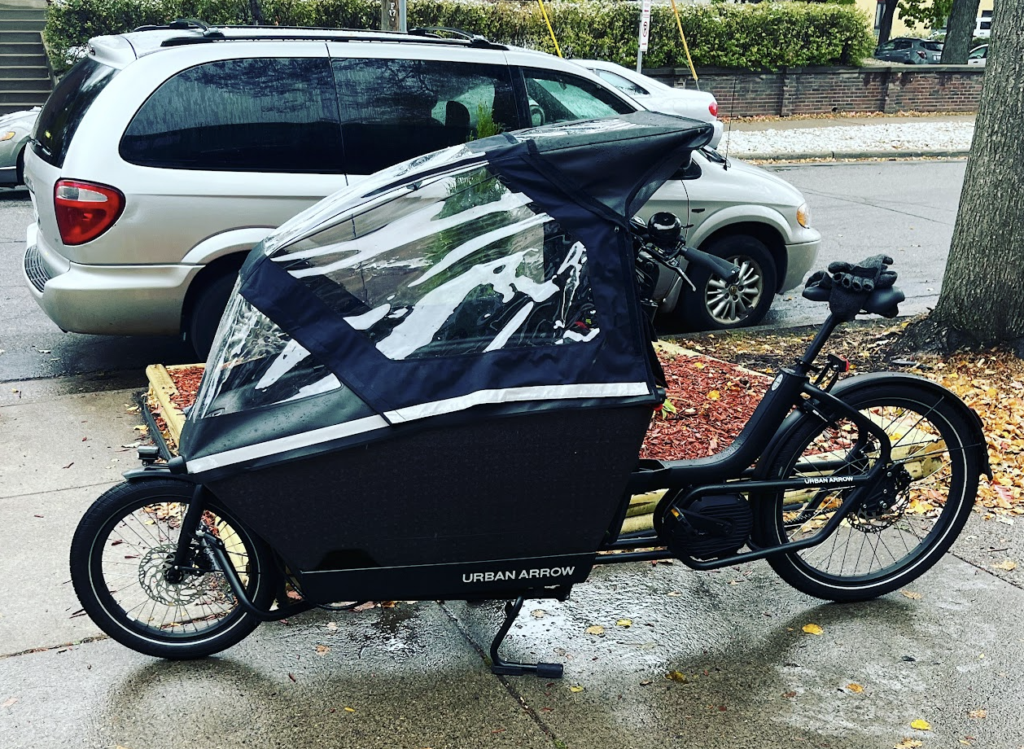
I left my backpack in the bike while I went inside McDonald’s to grab my coffee.
I’ve been doing this for years and have never had an issue. The McDonald’s has a glass front, so I can see my bike from inside. Plus, since I was just running in to pick up a coffee I’d already ordered, I knew I’d only be inside for a moment.
Unfortunately, during the short time I was inside, someone came by and stole the backpack right out of my bike. I usually pay pretty close attention to my bike when I’m inside, but whoever stole my backpack caught me slipping for just a minute.
The theft was caught on surveillance video, so there wasn’t much question about what happened. Someone had taken my backpack, and with it, my laptop.
Obviously, this was a pretty frustrating situation. I’d purchased the MacBook Air directly from Apple in mid-April, meaning I’d owned it for less than four months. The laptop cost $1,204.14, so this wasn’t exactly a small loss.
And unfortunately, the laptop wasn’t the only thing I lost. The thief took my entire backpack, which meant I also lost the backpack itself, along with some charging plugs and various other miscellaneous things I had inside.
After discovering that my backpack and computer had been stolen, I filed a police report documenting the theft. At that point, I figured I was probably out the cost of the laptop and everything else in my backpack.
But then, after talking with my brother about possible insurance coverage, I started wondering whether the credit card I’d used to purchase the laptop might offer some protection.
Chase Ink Business Cash Purchase Protection
I have a lot of credit cards, mainly because I’m always taking advantage of sign-up bonuses and other benefits.
One of the cards I have is the Chase Ink Business Cash, which is a no-annual-fee business credit card. I opened this card back in March 2026 for a new sign-up bonus, and it happened to be the card I used when I purchased my computer.
One of the benefits of the Chase Ink Business Cash is Purchase Protection. Under the benefit terms applicable to my card, eligible purchases are covered against theft or damage for 120 days from the purchase date, subject to certain limitations and exclusions.
The benefit provides coverage of up to $10,000 per item and $50,000 per account. That’s a pretty substantial benefit for a credit card that doesn’t even have an annual fee.
My Chase Purchase Protection Claim Timeline
Here are the important dates from my experience:
- April 16, 2026: Purchased my MacBook Air directly from Apple for $1,204.14
- August 4, 2026: Backpack containing my MacBook Air was stolen from my bike
- August 5, 2026: Submitted my Chase Purchase Protection claim
- August 14, 2026: Received the full $1,204.14 reimbursement in my checking account
Since the laptop was stolen within 120 days of the purchase date, it appeared to fall within the coverage period.
And I was cutting it pretty close! If the theft had occurred just a couple of weeks later, I would have been outside the 120-day coverage window.
Of course, just because something happens during the coverage period doesn’t automatically mean it’s covered. There are exclusions and other requirements, so I still needed to submit a claim and see what the benefit administrator determined.
My Biggest Concern: Would Chase Cover Something Stolen From My Bike?
This was probably my biggest concern when I started looking into the benefit. The laptop wasn’t stolen from my house or taken directly out of my hands. It was inside a backpack that I’d left on my bike while I went into McDonald’s. I wasn’t sure whether Chase would consider that a covered theft or whether the face that I’d left the backpack in my bike would create some sort of issue.
In my situation, though, there was clear evidence that an actual theft had occurred. Someone had physically taken the backpack from my bike, and the incident was captured on surveillance video. I also had a police report documenting the theft.
I decided the best thing to do was simply submit the claim, explain exactly what happened, and let the adjuster make a determination.
It turns out that leaving the backpack on my bike didn’t prevent my claim from being approved.
That said, my experience doesn’t necessarily mean every theft from an unattended bike will be covered. Every claim depends on the circumstances and the specific terms of the card’s benefits.
Still, I’m glad I didn’t automatically assume my claim would be denied.
How I Filed My Chase Purchase Protection Claim
The actual claim process was fairly straightforward.
To file my claim, I went to the Chase Card Benefits website and initiated a Purchase Protection claim.
I entered information about the laptop, including when I’d purchased it, how much it cost, and the circumstances surrounding the theft. I also provided the laptop’s serial number and a written statement explaining what happened.
The next step was submitting documentation to support my claim. Chase required the following documents:
- Chase credit card statement with the purchase. This showed the Apple purchase for $1,204.14 and established that I’d purchased the laptop using my Chase Ink Business Cash card.
- Original Apple receipt. Since I bought the laptop directly from Apple, I had a receipt documenting the purchase.
- Police report. This documented the theft and the circumstances surrounding it.
- Homeowners insurance declarations page. This showed my homeowners insurance coverage and deductible.
- MacBook serial number and incident statement. I provided these when I initially filed the claim.
One thing I’d recommend if you’re ever in a similar situation is to save your receipts for expensive purchases. It’s pretty easy to forget about a receipt once you’ve bought something, but having it available can make an insurance claim much easier. I buy almost everything online, so it’s usually pretty easy for me to find receipts somewhere in my emails.
What About My Homeowners Insurance?
One interesting part of this process was figuring out how my homeowners insurance factored into the claim. Purchase Protection is generally secondary coverage, meaning other applicable insurance may need to be considered first.
I have homeowners insurance, but my deductible is $5,000. Since the laptop only cost $1,204.14, the loss was well below my homeowners insurance deductible.
Even if the theft otherwise qualified for coverage under my homeowners policy, there wouldn’t be a payment because the loss was smaller than my deductible.
I needed to show Chase that my homeowners insurance wouldn’t reimburse me for the laptop. To do this, I submitted my homeowners insurance declarations page showing the $5,000 deductible. Since my deductible was higher than the cost of the laptop, I wasn’t required to submit the claim to my homeowners insurance first (this makes logical sense, as it’d be a waste of time to submit a claim where the deductible is higher than the covered loss).
This is another reason why Purchase Protection can be valuable. Even if you have homeowners or renters insurance, your deductible might be too high for it to help with a relatively small theft. And while $1,200 isn’t a huge amount compared to something like a house or car, it’s still a lot of money to lose.
Chase Approved My Purchase Protection Claim and Reimbursed Me $1,204.14 in Just 9 Days!
I submitted my Chase Purchase Protection claim on August 5, 2026, the day after my MacBook Air was stolen. After uploading all my documentation, my claim showed a status of “Open – Adjuster Review.”
At that point, there wasn’t much else for me to do. I’d provided all the documentation Chase asked for, so I just had to wait and see what happened.
On August 14, 2026, just nine days after submitting my claim, I received notice that my claim had been approved!
Even better, I received a deposit of $1,204.14 directly into my checking account that same day. That’s the full amount I paid for my MacBook Air.

I have to say, I was pretty impressed with how smoothly everything went. From submitting the claim to having the money deposited into my checking account, the entire process took just nine days. I find it pretty remarkable that a credit card with no annual fee offers a benefit like this.
I’ve always been a big fan of credit cards for their sign-up bonuses and rewards, but this was a good reminder that the insurance benefits can be extremely valuable too.
Obviously, I’d rather not have had my laptop stolen in the first place. But getting the entire purchase price back in less than two weeks definitely made the situation a lot less painful.
I Didn’t Even Know About Purchase Protection When I Bought My MacBook
One thing I should mention is that I didn’t actually use my Chase Ink Business Cash to purchase the MacBook because of its Purchase Protection benefit. I mainly use whichever credit card I need to put spending on to earn sign-up bonuses. So it was pretty much just luck that I happened to use a credit card that offered this benefit. In fact, if I’d used one of my American Express cards instead, I might have been out of luck.
Many American Express cards offer Purchase Protection for only 90 days, compared to the 120 days offered by my Chase Ink Business Cash. Since my laptop was stolen more than 90 days after I purchased it, that difference could have been the deciding factor in whether I received any reimbursement.
It’s pretty crazy to think that something as simple as which credit card I happened to use could make a $1,200 difference.
That being said, now that I’ve gone through this experience and seen how well Purchase Protection worked, it’s definitely something I’ll pay more attention to in the future.
When I’m making a big purchase, I generally focus on earning sign-up bonuses or maximizing my points and cashback.
Going forward, though, I think I’ll also consider which credit cards offer the best Purchase Protection benefits, especially when I’m buying expensive electronics.
Things I Learned From My Chase Purchase Protection Experience
There are a few takeaways from this experience that I think are worth keeping in mind.
1. Pay Attention to Your Credit Card Benefits
I primarily focus on sign-up bonuses and hitting minimum spend requirements when deciding which credit card to use. But insurance benefits like Purchase Protection can be very valuable.
In this case, a benefit on a no-annual-fee credit card ended up protecting me against a loss of more than $1,200.
2. Keep Documentation for Expensive Purchases
Having the original Apple receipt and my Chase credit card statement made it easy to establish when I’d purchased the laptop and how much I’d paid.
If you’re purchasing something expensive, it’s worth keeping a copy of the receipt somewhere you can easily find it. You never know when you might need it.
3. File a Police Report Right Away if Something Is Stolen
Having a police report and surveillance evidence helped document that this was an actual theft rather than a misplaced or lost item.
One important detail is that Chase may require a police report documenting the theft. For Chase, their benefit terms say that a police report needs to be filed within 48 hours of the incident or as soon as reasonably possible.
Luckily, I’d filed my police report right away, so this wasn’t an issue for me. But it’s something worth knowing if you ever need to submit a Purchase Protection claim. I’d recommend reporting any theft as soon as possible rather than risking problems with your claim.
4. Don’t Automatically Assume Your Claim Won’t Be Covered
I was genuinely unsure whether leaving my backpack on my bike would be a problem, and I could have decided not to bother filing a claim because I thought Chase might deny it.
Instead, I submitted the documentation, accurately explained what happened, and let the claims administrator decide. In the end, not only was my claim approved, but I had the full reimbursement in my checking account just nine days after submitting it.
Final Thoughts
Having my computer stolen was obviously not a great experience.
Not only did I lose a practically brand-new laptop, but I also lost my backpack and a bunch of miscellaneous accessories that were inside it.
And because computer prices had increased since my original purchase, replacing my MacBook ended up costing me an additional $184.84, even after receiving the full reimbursement from Chase.
But considering that I could have been out the entire $1,204.14 cost of my laptop, I’m pretty happy with how everything worked out.
It’s easy to focus on sign-up bonuses, points, and cashback when thinking about credit card rewards. But this experience was a good reminder that some of the less exciting credit card benefits can end up being incredibly valuable.
The funny thing is that I didn’t even intentionally use my Chase Ink Business Cash because of its Purchase Protection benefit. It was basically just luck that I happened to use the right card.
Now that I know how valuable this benefit can be, it’s definitely something I’ll consider more carefully when deciding which card to use for expensive purchases.
Hopefully, I never have to deal with something like this again. But I’m glad I remembered Purchase Protection and took the time to submit a claim. Sometimes those little credit card benefits really do pay off.
This post may contain affiliate links.
More Recommended Ebike/Scooters
Check out these other ebikes and scooters I've reviewed:
- Urban Arrow Ebike – Last year, I made one of the largest purchases I’ve ever made – I bought a $9,000 electric cargo bike from Urban Arrow. In my Urban Arrow review, I will discuss what it is and why I decided to buy this bike, as well as discuss how impactful a bike like this can be on your journey to financial independence.
- Troxus Explorer Step-Thru Ebike – The Troxus Explorer Step-Thru is a fat-tire ebike that I’ve had the pleasure of riding for a while now. It has amazing power, great looks, and awesome range. If you’re looking for a great fat-tire ebike that offers a lot for the price, the Troxus Explorer Step-Thru is definitely one for you to consider. Check out my Troxus Explorer Step-Thru Review.
- Hovsco HovBeta Ebike – The HovBeta is a folding ebike with great specs and a lot of interesting features, and importantly, it’s sold at a good price point. I’ve had a blast commuting with it and using it to do deliveries with DoorDash, Uber Eats, and Grubhub. Check out my Hovsco HovBeta Ebike Review.
- Vanpowers Manidae Ebike – The Vanpowers Manidae is a fat tire ebike that I’ve been riding as my primary winter commuting bike and have also been using it to do food delivery with apps like DoorDash, Uber Eats, and Grubhub. After clocking in a decent number of miles with this ebike, I wanted to write a post sharing what my experience with the Vanpowers Manidae ebike has been like. Check out my Vanpowers Manidae Review.
- Sohamo S3 Step-Thru Folding EBike Review – A Great Value Folding Ebike – The Sohamo S3 Step-Thru Folding Ebike is an entry-level folding ebike that offers a lot of value for the price point. I’ve been riding the Sohamo S3 for a while now, putting the bike through its paces, and I have to say, this bike has exceeded all of my expectations. Check out my Sohamo Review.
- KBO Flip Ebike – The KBO Flip is an excellent bike. I’ve had a great time riding it and think it’s a versatile bike that can be used for a lot of purposes and can fit a variety of lifestyles. It’s worked out great for me as a general commuter bike and as a food delivery bike. Check out my KBO Flip Review.
- Hiboy P7 Commuter Ebike – The Hiboy P7 is an excellent electric commuter bike that’s offered at an affordable price point. The range and speed of this bike are both very good, so you won’t have any trouble getting anywhere you need to go with it. As a food delivery vehicle, this is also good – with how much range it offers, you’ll be able to work all day on a single charge. Check out my Hiboy P7 Commuter Electric Bike Review.
- Himiway Escape Ebike – The Himiway Escape is an interesting bike for anyone looking for a moped-style ebike. If you’re a gig economy worker, the Himiway Escape is particularly interesting and it’s possible to think of it as an investment, especially if you can opt to do deliveries with the Himiway versus using a car. It’s not cheap, but you can definitely make your money back when you compare the mileage you’ll put on your car versus using an ebike. Check out my Himiway Escape Bike Review.
- Espin Sport Ebike – The Espin Sport is a good ebike for someone who is looking for an ebike that feels and rides more like a regular bike. There are many ebikes that are really only bikes in name. In reality, they’re basically electric mopeds. The Espin Sport, by contrast, is a bike you could probably ride without the battery and you’d feel like you’re just riding a regular bike. Check out my Espin Sport Review.
- Varla Eagle One Scooter – The Varla Eagle One is an excellent scooter that can make sense for a lot of people. It can work as a primary mode of transportation. You can use it to work on gig economy apps like DoorDash, Uber Eats, and Grubhub. And it can also be a recreational vehicle if you’d prefer to use it for that. Check out my Varla Eagle One Review.
- Varla Falcon Scooter – The Varla Falcon is an excellent scooter that offers a good amount of power at a lower price point compared to more powerful scooters. It’s not exactly an entry-level scooter, nor is it a high-powered scooter. I think it fits somewhere in-between those two categories – an intermediate scooter if I had to give it a category. Check out my Varla Falcon Review.
- Hiboy S2 Scooter – The Hiboy S2 is an excellent entry-level commuter scooter that's perfect for someone looking to save some money in transportation costs and improve their commute. Check out my Hiboy S2 Review.
- Hiboy S2R Scooter – The Hiboy S2R is one of the more interesting electric scooters I’ve been able to test out. It’s not a high-powered scooter, but for an everyday transport option, it’s very useful, especially given some of the unique features that it has. Indeed, for the price, the Hiboy S2R might be the best value scooter I’ve used. Check out my Hiboy S2R Review.
- Fucare H3 Scooter – The Fucare H3 is a fun scooter and I’ve enjoyed testing it out. For a daily commuter or quick trips or errands, the Fucare H3 is probably the scooter I’ll use. It’s portable and easy to maneuver, so it’s just easier to take on the road when I need it. Check out my Fucare H3 Scooter Review.
More Recommended Investing App Bonuses
For additional investing app bonuses, be sure to check out the ones below:
- M1 Finance ($75) – This is a great robo-advisor that has no fees and allows you to create a customized portfolio based on your risk tolerance. You also get $75 for opening an account. Check out my M1 Finance Referral Bonus – Step-By-Step Guide.
- SoFi Invest ($25) – SoFi Invest is an easy brokerage account bonus that you can earn with just a few minutes of work. Use my SoFi Invest referral link, fund your SoFi Invest brokerage account with just $10 and you’ll get $25 of free stock. I also have a step-by-step guide for the SoFi Invest referral bonus.
- Robinhood (1 free stock) – Robinhood gives you a free stock valued between $2.50-$225 if you open an account using my referral link.
- Public (1 free stock) - Public gives you a free stock valued between $3-$70 if you open an account using my referral link.
More Recommended Bank Account Bonuses
If you’re looking for more easy bank bonuses, check out the below options. These bonuses are all easy to earn and have no fees or minimum balance requirements to worry about.
- Ally Bank ($100) – Of all the banks out there, Ally is, without a doubt, my favorite. At the moment, Ally is offering $100 to customers who open an eligible Ally account and meet the requirements. Here are the step-by-step directions to earn your Ally Bank referral bonus.
- Chime ($100) - Chime is a free bank account that offers a referral bonus if you use a referral link and complete a direct deposit of $200 or more. In practice, any ACH transfer into this account triggers the bonus. This bonus is easy to earn and posts instantly, so you’ll know if you met the requirements as soon as you move money into the account. I wrote a step-by-step guide on how to earn your Chime referral bonus that I recommend you check out.
- US Bank Business ($400/$1200) – This is a fairly easy bank bonus to earn, since there are no direct deposit requirements. In addition, you can open the Silver Business Checking account, which comes with no monthly fees. Check out how to earn this big bonus here.
- Current ($50) – Current is a free fintech bank that’s offering new users a $50 referral bonus after signing up for an account using a referral link. Current is an easy bonus to earn and also gives you access to three savings accounts that pay you 4% interest on up to $2,000. That means you can put away up to $6,000 earning 4% interest. That’s very good and makes Current an account I recommend to everyone. Check out my step-by-step guide on how to earn your Current Bank bonus.
- Novo Bank ($40) - Novo bank is a free business checking account that’s currently offering a $40 bonus if you open a Novo business checking account using a referral link. In addition to being a good bank bonus, Novo is also a good business checking account. It has no monthly fees or minimum balance requirements and operates a good app and website. Indeed, it’s the business checking account I currently use for this blog. Check out my post on how to easily open a Novo account.
- Varo ($25) – Varo is a free fintech banking app similar to Chime or Current. It’s currently offering a $25 bonus to new users that open a new Varo account with a referral link. The bonus for this bank is very easy to meet, all you need to do is spend $20 within 30 days of opening your Varo account. Check out my step-by-step guide to learn how to earn this bonus.

Kevin is an attorney and the blogger behind Financial Panther, a blog about personal finance, travel hacking, and side hustling using the gig economy. He paid off $87,000 worth of student loans in just 2.5 years by choosing not to live like a big shot lawyer.
Kevin is passionate about earning money using the gig economy and you can see all the ways he makes extra income every month in his side hustle reports.
Kevin is also big on using the latest fintech apps to improve his finances. Some of Kevin's favorite fintech apps include:
- SoFi Money. A really good checking account with absolutely no fees. You'll get a $25 referral bonus if you open a SoFi Money account with a referral link, and an additional $300 if you complete a direct deposit.
- 5% Savings Accounts. I'm currently getting 5.24% interest on my savings through a company called Raisin. Opening a Raisin account takes minutes to complete, it's free, and all of your funds are FDIC-insured. I explain how it works, why I'm now using it to store my emergency fund and any other cash savings I have, and why I recommend everyone check it out in this review.
- US Bank Business. US Bank is currently offering new business customers a $400/$1200 signup bonus after opening a new account and meeting certain requirements.
- M1 Finance. This is a great robo-advisor that has no fees and allows you to create a customized portfolio based on your risk tolerance. You also get $75 for opening an account.
- Empower. One of best free apps you can use to monitor your portfolio and track your net worth. This is one of the apps I use to track my financial accounts.
Feel free to send Kevin a message here.

Leave a Reply